
Worried about hackers stealing your personal information? Concerned about clicking on a dangerous link by mistake? You’re not alone. Millions of people face these digital threats every single day.
That’s why I started looking for an app that could protect my data without being too complicated, and that’s how I found Digital Secure by Verizon. It works like a personal bodyguard for your phone and computer.
In this blog, I’ll walk you through what Digital Secure is, how it works, its key features, pricing options, and whether it’s really worth it. By the end, you’ll know exactly how this app can help keep your digital life safe and stress-free.
What is Digital Secure App?
Digital Secure is a comprehensive security application developed by Verizon, one of America’s leading telecom companies. Think of it as a Swiss Army knife for digital protection; it bundles multiple security tools into one convenient app.
The app automatically scans your device for threats, monitors your personal information on the dark web, protects your Wi-Fi connections, and alerts you whenever something suspicious happens.
With over 10 million downloads and solid user ratings, it’s become a trusted security companion for smartphone and computer users.
Digital Secure at a Glance
| Features | Details |
|---|---|
| Apple Store Rating | 4.5 out of 5 |
| Google Play Rating | 4.1 out of 5 |
| Total Downloads | 10+ Million |
| Basic Version | Free |
| Premium Version | $5 per month |
| Platforms | iOS, Android, Windows, Mac |
How Does Verizon Digital Secure Work?
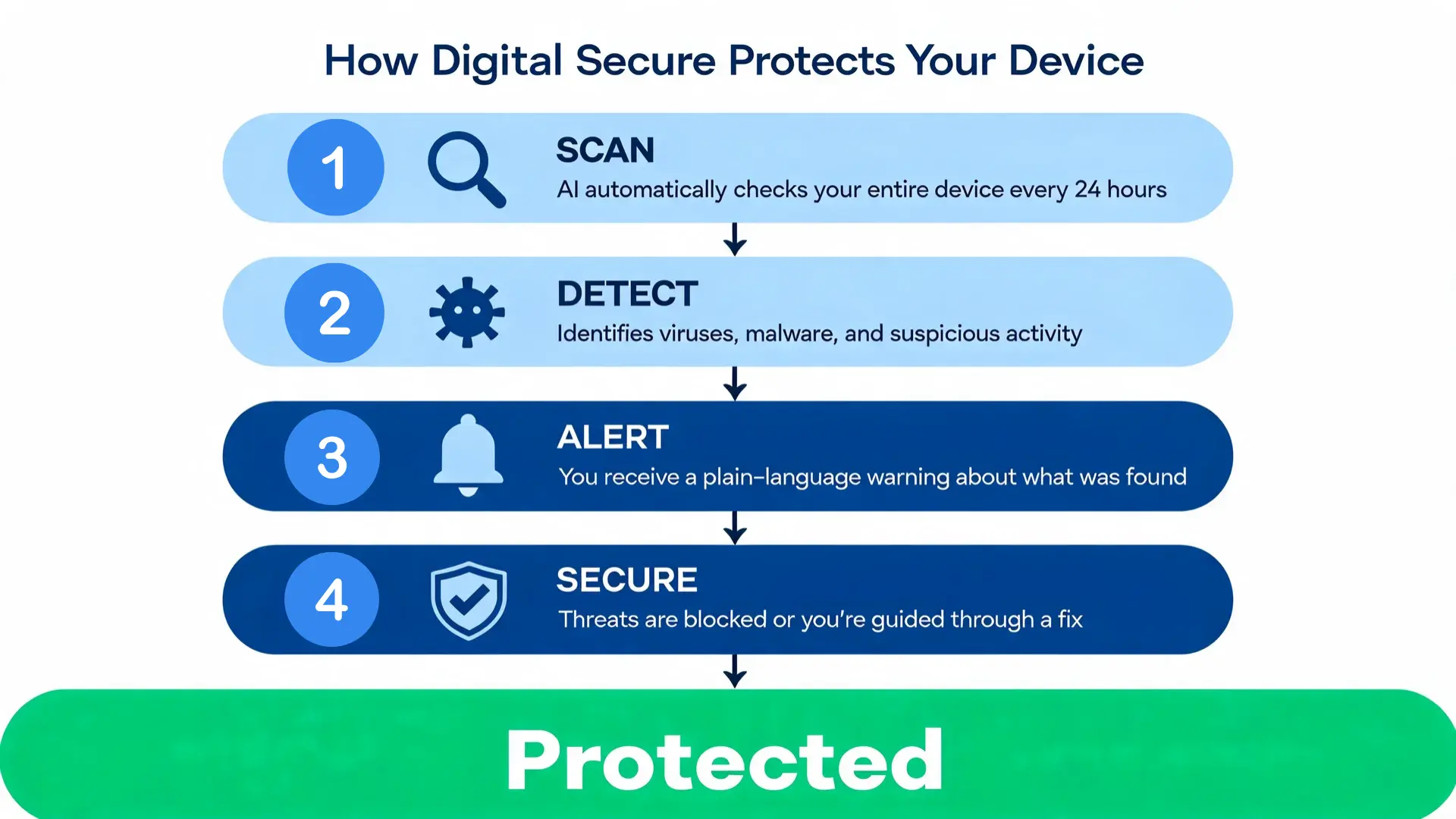
Digital Secure uses artificial intelligence (AI) technology to protect your devices. Every 24 hours, the app automatically scans your entire device if you’re connected to public Wi-Fi at a coffee shop or using your home internet. You can also run manual scans anytime you want extra peace of mind.
The scanning process works like this:
- Scan: The AI checks your device for threats
- Detect: It identifies viruses, malware, or suspicious activity
- Alert: You get a warning message if something’s wrong
- Secure: The app blocks threats or guides you to fix issues
The AI searches databases across the internet to check if your phone number, email address, Social Security number, or other personal details have been exposed in any data breaches. For premium users, it also scans crypto and dark web spaces, those hidden corners of the internet where criminals buy and sell stolen information.
When the scan finishes, Digital Secure sends you a clear message about what it found. No confusing tech jargon, just straightforward information you can actually understand.
Top Features of Verizon Digital Secure
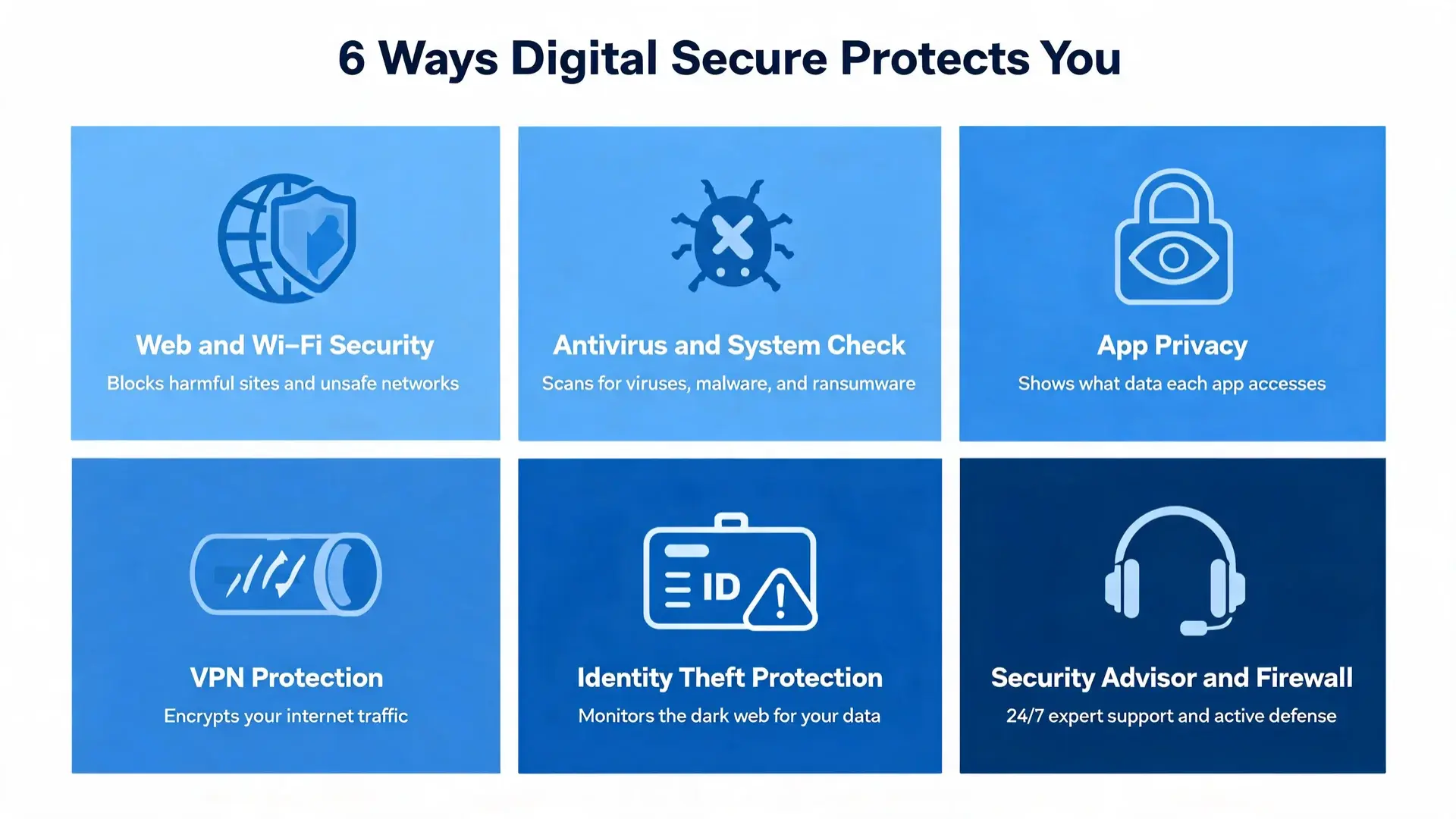
Digital Secure packs eight powerful security features into one app. Here’s what each feature does and how it protects you.
1. Web and Wi-Fi Security
Digital Secure checks websites in real-time and blocks access to pages that contain harmful content. You’ll see a warning message before you accidentally visit a dangerous site. The app also monitors your connection on public Wi-Fi networks at airports, hotels, and coffee shops, alerting you if something looks suspicious.
Premium users get an added layer of protection: a Secure VPN that creates a private tunnel for your internet activity, preventing network managers, providers, and hackers from tracking what you do online.
2. Antivirus and System Check
The app runs continuously in the background, watching for threats including viruses that can damage your files, malware designed to steal your information, and ransomware that locks your device until you pay.
After you download any new app, Digital Secure performs a thorough system check, looks for security vulnerabilities, and creates a detailed report. It also verifies that your operating system is up to date.
3. App Privacy
Most apps ask for access to your contacts, photos, location, and other personal data. Digital Secure shows you exactly which data each app on your device can access, so you can decide whether to trust it or remove it.
Importantly, Digital Secure never sells your information to third parties. Your privacy stays private.
4. VPN Protection
When you turn on the Secure VPN, your internet traffic gets encrypted before it reaches the web. Your location stays hidden, your sensitive information stays private, and hackers can’t intercept your data even on compromised public Wi-Fi.
The VPN routes your searches through a private server, creating a secure tunnel that covers everything you do online.
5. ID and Identity Theft Protection
Identity theft happens when criminals steal your personal information and use it to open credit cards, take out loans, or commit fraud in your name, making it one of the most important threats covered by financial literacy awareness.
Digital Secure’s identity theft monitoring watches over your personal information around the clock, checks if your Social Security number, email, or phone number appears in dangerous databases, and sends instant alerts if your information is compromised.
While Verizon can’t guarantee 100% protection against identity theft, this monitoring gives you a real advantage. You’ll know about breaches quickly and can take action before serious damage occurs.
6. Security Advisor and Firewall
The Security Advisor feature provides round-the-clock support from real security experts, in-app chat for questions anytime, one-click advisory sessions, and proactive tips to strengthen your security.
The built-in firewall guards against malicious attacks and alerts you to anything that might interfere with your device’s normal operation.
When Does Digital Secure Issue Warnings?
Digital Secure responds in three main situations:
- Malicious Links: When you’re browsing the internet and accidentally click on a contaminated link, you’ll get an immediate warning before the page loads.
- Unsafe App Downloads: If you’re about to download an app that contains viruses or malware, Digital Secure stops you with a clear alert message.
- Dangerous Wi-Fi Connections: When connecting to public Wi-Fi that carries security risks, the app warns you before your device joins the network.
These real-time alerts help you make smart decisions instantly. You don’t need to be a tech expert; the app explains the danger in plain language and tells you what to do next.
Digital Secure App Pricing: Free vs Premium
You can start using Digital Secure for free. If you want the full protection package, the premium versions are affordable and flexible.
| Plan | Monthly Cost | What You Get |
|---|---|---|
| Free Version | $0 | Basic device scans, malware alerts, app privacy checks, and system monitoring |
| Premium (Single Line) | $5 | Everything in Free + Secure VPN, spam detection, dark web monitoring, identity theft alerts, and priority support |
| Premium (Full Account) | $10 | Everything in Premium + protection for all eligible lines, Windows and Mac computer protection, business and personal data security |
The $5 premium plan costs less than a coffee but covers your entire digital life. Compared to other security apps that charge $10 to $15 per month, Digital Secure offers strong value.
The $10 account-wide plan covers smartphones, tablets, and computers under one subscription. Both premium plans allow cancellation at any time with no long-term contracts required.
Is Verizon Digital Secure Worth It?
Digital Secure offers solid value with affordable pricing, comprehensive protection against multiple threats, and an interface that anyone can navigate.
The app includes 24/7 expert support, multi-device coverage, and a firm privacy policy against selling user data. Over 10 million users have given it 4+ star ratings across both major app stores.
That said, premium features like VPN and dark web monitoring require a paid subscription, and the app works best for Verizon customers. Identity theft monitoring also has some limitations that Verizon acknowledges openly.
For anyone looking for affordable, all-in-one security without complexity, Digital Secure is worth it, particularly at $5 per month for premium protection.
The Growing Importance of Digital Security Apps
Digital security is no longer something only IT professionals need to think about. The numbers make a strong case:
- 65% of people consider digital privacy a critical social issue
- 83% of consumers believe Congress should pass data privacy laws
- 35% of users think that companies recording and sharing user data is inappropriate
- The global cybersecurity market is projected to exceed $345 billion by 2026
Cybersecurity spending has grown every year, rising from $34 billion in 2017 to over $54 billion in 2020. Apps like Digital Secure are making personal security accessible to regular people, not just professionals, following the same pattern seen in AI arbitrage tools across other industries.
As cyber threats grow more sophisticated, having a reliable security app has shifted from optional to necessary.
Frequently Asked Questions About Verizon Digital Secure
What is the difference between the free and premium versions of Digital Secure?
The free version covers essential protection, including automatic device scans, malware alerts, app privacy checks, and basic system monitoring. The $ 5-per-month premium tier adds Secure VPN for encrypted browsing, dark web monitoring for your personal data, identity theft alerts, and spam call detection.
The $10 per month full account plan extends all of those features to every eligible line on your account, along with protection for Windows and Mac computers.
How does Digital Secure’s dark web monitoring actually work?
Digital Secure continuously scans dark web databases and underground forums where stolen personal information is traded or sold.
You provide the personal details you want monitored, such as your email address, phone number, or Social Security number, and the app alerts you if any of that information appears in a known breach or data dump. When an alert fires, the app gives you clear steps on what to do next, including changing passwords and contacting relevant institutions.
Does Digital Secure slow down your phone?
Digital Secure runs quietly in the background without causing noticeable slowdowns on modern smartphones. The app is designed to scan automatically without interrupting your normal use, and background processes are kept lightweight.
Some users on older devices have reported minor battery impact when real-time Wi-Fi scanning is active, but this is generally minor. If you notice any performance impact, you can adjust scan frequency in the app’s settings or disable features like continuous Wi-Fi monitoring while keeping core antivirus protection active.
Final Thoughts
I’ve covered everything you need to know about Digital Secure, and it’s genuinely one of those apps that delivers real peace of mind. In a world where hackers and scams seem to be everywhere, having a tool that quietly protects your data in the background is worth having.
It’s simple, affordable, and doesn’t require any technical knowledge to use. If you haven’t tried it yet, start with the free version and see how it fits into your routine. Upgrading is straightforward if you decide you want the fuller protection.
Download Digital Secure and take control of your online safety today.